



Home » Products & Workflows Hub » AI-Driven Design » Analog and Custom IC Design » Jivaro Pro
Jivaro Pro: parasitic reduction for post-layout SPICE simulation
Your design is ready… but your simulation is still running…
What Jivaro Pro does
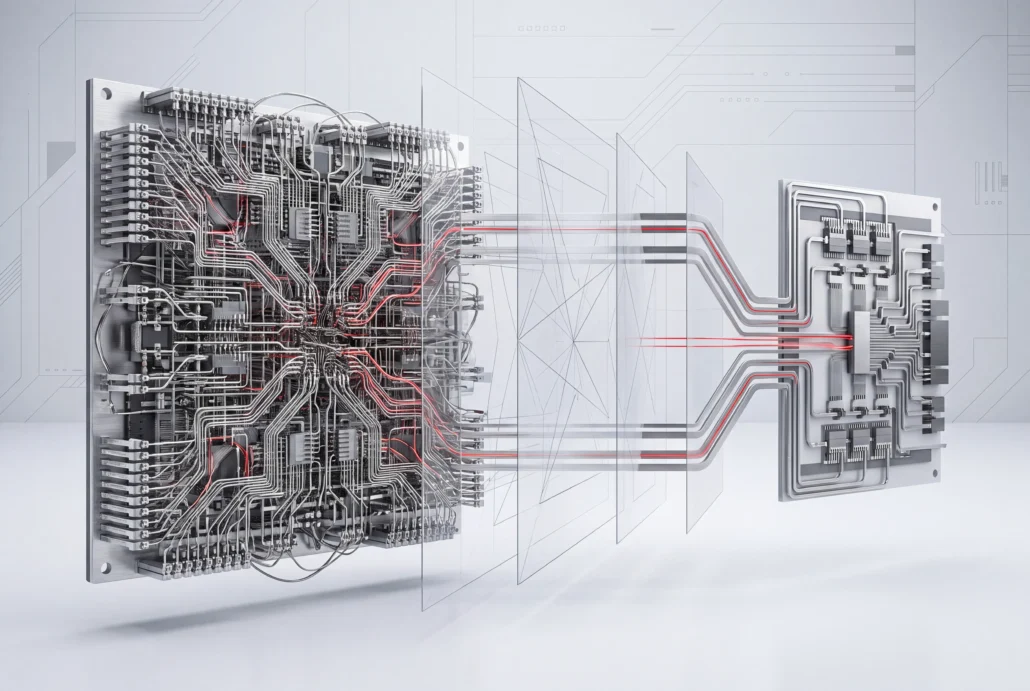
More than faster simulation. Greater engineering productivity.
Faster post-layout runs
Cut extracted parasitic netlists down before simulation so runs finish sooner.
Accuracy you control
Let automatic mode adapt to your design, or set the balance net by net.
Works with your flow
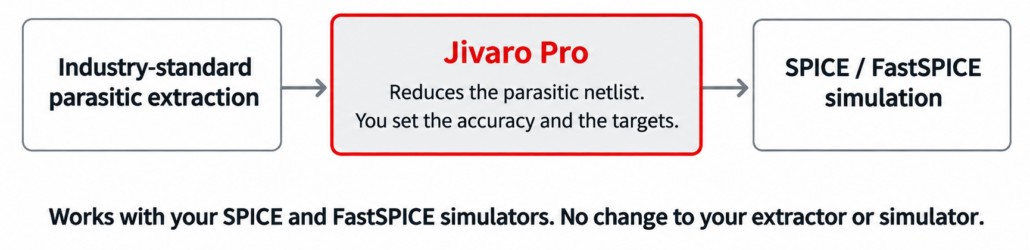
Fits between your existing extractor and SPICE simulator. Nothing else in your flow changes.
Where post-layout simulation gets stuck
Too large to run
Extracted netlists exceed memory and compute limits.
Too slow to iterate
Runs stretch from hours to days and hold up design decisions.
Too limited to cover
Corners, temperatures and modes get skipped to save time.
Capabilities
You decide how hard the netlist gets cut, and where.
Reduction
Model order reduction, a mathematical approach, shrinks the parasitic network within the tolerance you choose. Start in automatic mode, which adapts to your design, or take over any of more than 30 parameters when you want the speed-accuracy balance in your own hands.
Coverage
R, RC, RCC, RLC and RLCK networks, with controlled sources. Netlists extracted across multiple corners reduce too, and so do parasitic networks that change with temperature.
Power nets and metal fills can stay in your simulation, adding accuracy without the runtime they’d normally cost.
Formats
Bring DSPF, SPEF, SPICE or Spectre netlists, Calibre View parasitic netlists, or OpenAccess databases.
Jivaro Pro reduces extracted parasitic netlists in all the formats above.
Jivaro Pro supports technology nodes down to 2nm.
Independence
Jivaro Pro works with the extraction and simulation tools you already use. It plugs into your current flow and works alongside the major EDA suites. Where your extractor or simulator already offers reduction, Jivaro Pro adds a dedicated step that lets you choose where and how much to reduce.
Jivaro Pro runs on Red Hat Enterprise Linux 8.4 and later (including RHEL 9), Rocky Linux 8.4, and SUSE Linux Enterprise Server 15 SP7. No longer supported (EOL): CentOS Linux, RHEL 7.x and 8.0 to 8.3, and SUSE 12.
Target any net or subcircuit
Aim reduction at single nets, whole subcircuits or paths anywhere in the hierarchy, and give each its own threshold.
Merge multi-finger devices
Merge multi-finger devices and strip out dummy structures, then configure and review it all in a GUI.
What you can use it for
The post-layout runs that usually hold a schedule up.
Blocks that won't simulate in full
Run post-layout simulations that would not finish on the netlist as extracted, including designs that were previously out of reach.
Simulations with power nets and metal fills
Include power nets and metal fills for accuracy. The reduced netlist keeps run time in check.
Multi-corner and temperature-dependent work
Run corner sweeps and temperature-dependent parasitics through Jivaro Pro like any other netlist.
Faster Full-Chip Verification
Close your design with confidence, and ensure you can check the process and temperature corners you may be neglecting.
Proven across semiconductor applications
- Leading-edge foundries |
- Fabless SoC companies |
- IP design houses |
- IDMs
PLLs and oscillators
Measured: 2.1× to 15.2×
ADCs and data converters
Measured: 2.2× to 6.6×
Analog front ends and CTLEs
Measured: 4.0× to 4.5×
High-speed SerDes
Measured: 4.8× to 5.0×
Power management (LDOs)
Measured: 2.8× to 4.2×
Power amplifiers
Measured: 9.6×
Memory and DRAM
Measured: 2.4× to 2.6×
High-speed interface blocks (HDMI)
Measured: 12.0×
Advanced-node designs (3nm to 7nm)
Measured: 2.1× to 15.2×
Proof and resources
See what design teams measured on their own blocks.
Measured speedup by design type
Post-layout SPICE simulation, before and after Jivaro Pro, on designs from 130nm to 3nm. Typically 2× to 8× faster, and as much as 15× on some designs. Results vary with the design.
ADC, 7nm: a 14-day simulation reduced to under 7 days. Jivaro Pro took 30 minutes.
| DESIGN TYPE | PROCESS NODE | SPEEDUP |
|---|---|---|
| LDO | 3nm | 2.8× |
| SerDes | 5nm | 5.0× |
| LDO | 5nm | 4.2× |
| PLL | 5nm | 2.1× |
| Oscillator | 7nm | 15.2× |
| ADC | 7nm | 6.1× |
| VCO | 7nm | 5.0× |
| CTLE | 7nm | 4.5× |
| AFE (analog front end) | 7nm | 4.0× |
| ADC | 7nm | 2.2× |
| HDMI BIST | 12nm | 12.0× |
| RCO | 12nm | 8.3× |
| Data converter | 12nm | 4.2× |
| LDO | 12nm | 3.2× |
| PLL | 12nm | 3.1× |
| Memory | 16nm | 2.4× |
| Power amplifier | 22FDX | 9.6× |
| ADC | 22nm | 6.6× |
| DRAM | 22nm | 2.6× |
| SerDes | 28nm | 4.8× |
| SDLVA | 130nm | 4.8× |
Alps Alpine, which makes sensors and electronic components, adopted Jivaro Pro to speed up development of the ICs inside its high-precision sensor products.
“The introduction of Jivaro Pro is consistently reducing post-layout SPICE simulation run times while maintaining accuracy, with at least a 5X improvement observed at the 40nm and 55nm nodes.”
Yasuyuki Hattori, Senior Manager of IC Engineering Dept. Engineering Headquarters at Alps Alpine Co., Ltd.

eTopus builds ultra-high-speed mixed-signal IP for high-performance computing and data centers. On its FinFET flow, full post-layout runs on large blocks were taking weeks.
“…a full simulation on one of our blocks would run 20+ days. After using Jivaro Pro this runtime was reduced to 6 days while maintaining the designer’s accuracy requirements.”
Harry Chan, Founder and CEO, eTopus
Chung-Chun Chen, Director of Analog Design, shows how Jivaro Pro speeds up verification of high-frequency analog mixed-signal components.
Typically 2× to 8× faster post-layout SPICE simulation, and as much as 15× on some designs, with what it reduces, how targeting works, inputs and supported platforms.
Typically 2× to 8× faster post-layout SPICE simulation, and as much as 15× on some designs, targeted reduction by net, and device merging.
Stop waiting. Start verifying.
Discover how Jivaro Pro can accelerate your existing post-layout simulation workloads and unlock greater engineering productivity. Tell us which block takes longest to simulate and we will show you the runtime saved and the accuracy cost.
How an evaluation works: send us a netlist from your slowest run. We reduce it, you simulate the result in your own flow, and you compare run time and accuracy.
Questions about Jivaro Pro
What is parasitic reduction?
Parasitic reduction, sometimes called RC reduction, shrinks the resistor, capacitor and inductor network that extraction adds to a post-layout netlist. Most of those elements go, and the netlist's electrical behavior stays within the error budget you give it. Jivaro Pro does this with model order reduction, a mathematical method, and works alongside any reduction already built into your extractor or simulator.
How much speedup does Jivaro Pro give?
Typically 2× to 8× faster post-layout SPICE simulation, and as much as 15× on some designs. Speedup depends on design, simulator, and reduction and accuracy settings.
Does reduction cost accuracy?
Jivaro offers both an automatic mode and the ability to tailor reduction with best in class accuracy control. Automatic mode picks a balance for your design, and more than 30 parameters let you set it yourself, net by net if you need to. You can hold critical nets to strict accuracy and reduce power nets aggressively, all inside the same netlist. For example, you can hold critical nets to 1% accuracy, reduce intermediate nets to 5%, and reduce power nets aggressively.
Does Jivaro Pro work with non-Silvaco extraction and simulation tools?
Yes. Jivaro works with industry-standard parasitic extraction tools and with SPICE and FastSPICE simulators, reading your extracted netlist and passing a reduced netlist to your simulator, so nothing else in your flow has to change. See “Which parasitic netlist formats are supported?” for the supported inputs.
Which parasitic netlist formats are supported?
DSPF, SPEF, SPICE and Spectre netlists, Calibre View parasitic netlists, and OpenAccess extracted views. Inside those files, Jivaro Pro reduces R, RC, RCC, RLC and RLCK networks with controlled sources, and it handles multi-corner and temperature-dependent extractions too. Full power networks can be reduced alongside the signal nets.
Which technology nodes are supported?
Jivaro Pro is in use at technology nodes down to 2nm. Jivaro has been deployed for commercial design on Planar CMOS, SOI, FinFET and GAA nodes. Published speedup results cover designs from 130nm to 3nm.
Does Jivaro Pro replace the reduction in my extractor or simulator?
No. Jivaro Pro works alongside your extractor and simulator, so keep using them as you do today. Jivaro Pro adds a dedicated step in between, where you choose which nets to reduce, by how much, and how accurate the result must be.
Can I keep power nets and metal fills in my simulation?
Yes. Power nets and metal fills can stay in your simulation, adding accuracy without the runtime they would normally cost.
Does Jivaro Pro handle multiple corners and temperature-dependent parasitics?
Yes. Netlists extracted across multiple corners reduce too, and so do parasitic networks that change with temperature.
How do I analyze my parasitics before or after reduction?
How do I try Jivaro Pro on my design?
Tell us which post-layout run takes longest. We reduce a netlist from it, you simulate the result in your own flow, and you compare run time and accuracy. Use the Request a Technical Benchmark form, or see Evaluation Kit Information.
Related
Hipex
Extracts the parasitic network that Jivaro Pro then reduces
Viso
Analyze and debug parasitics, before or after reduction
PEX Certify
Compare extracted netlists to qualify your extraction flow
Analog and Custom IC
The full flow from schematic to signoff.
Short on SPICE simulation capacity? See SmartSpice.